 CasekeepLegal practice system
Not another Clio. Your firm’s own system.
Matters, time, billing, trust accounting and deadlines in one system, built for small firms. Pay once and it’s yours for life, with no subscription and no fee for each person you hire. It runs behind your firm’s own website, on your own accounts, so your data stays with you.
Made to fit. We change any screen, field, step or report to match how your firm works.
- Casekeep, 1 seat$499
- 2 extra seats at $99$198
The same three people on Clio’s entry plan: $1,764 a year, every year, at the listed starting price.
Click through the real thing.
This is the base system, running on a sample firm. Every part of it can be customized to fit how your firm works.
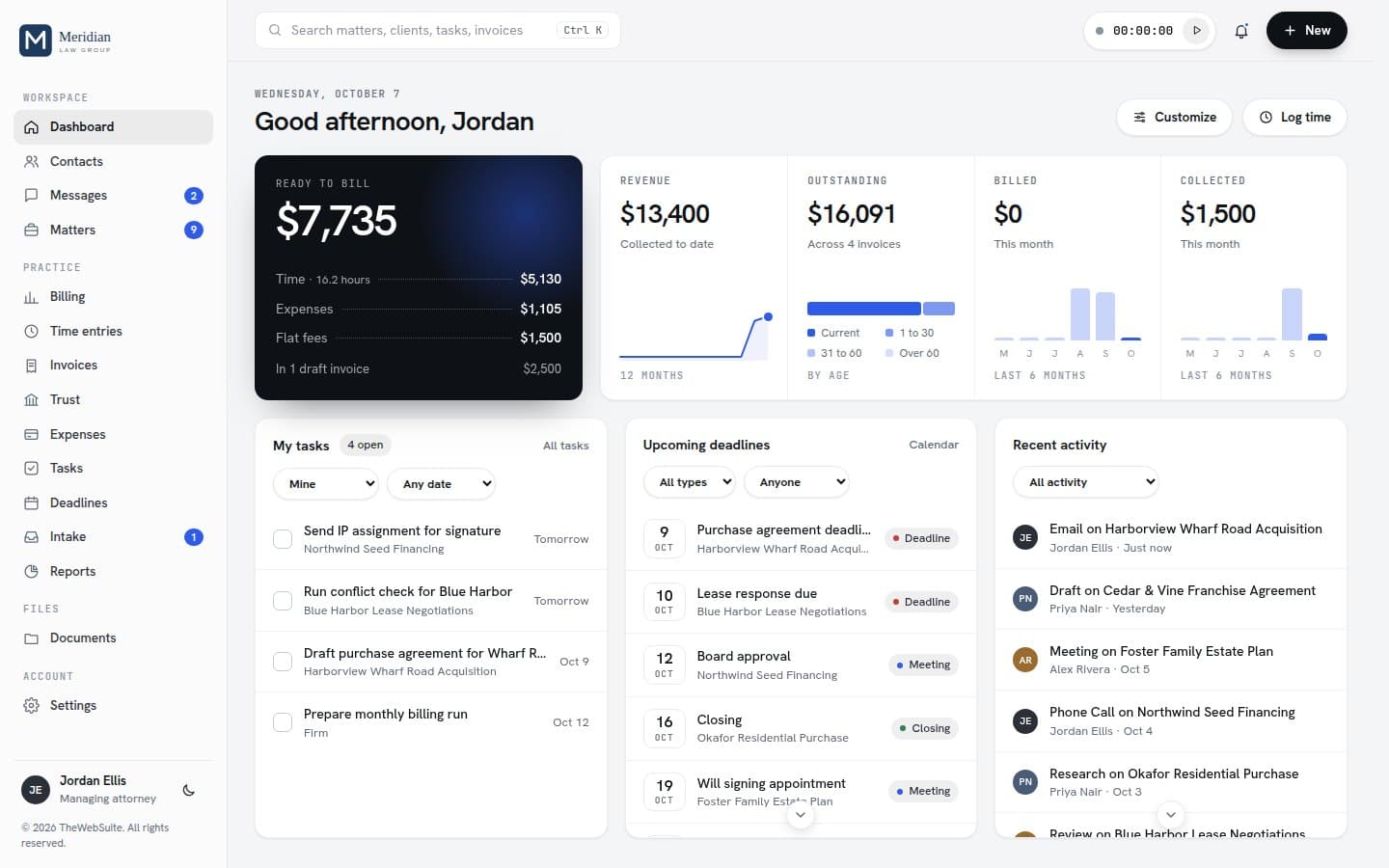
- Try 01Start a timer from the top bar, then log it to a matter.
- Try 02Run a conflict check on a new name.
- Try 03Open an invoice and switch between its three styles.
- Try 04Open Reports and run A/R aging.
Rented software charges every seat, every month.
- 01
The bill grows with the firm
Every new associate or paralegal adds another monthly seat, and the vendor sets next year’s price.
- 02
Your records live on their servers
Stop paying and you are left with an export and a migration.
- 03
You pay for the whole catalog
Plans bundle features a small firm never opens, and the one you need sits a tier higher.
| The same 3 people | 1 year | 3 years |
|---|---|---|
| Clio Entry planlisted starting price; higher plans are quoted | $1,764 | $5,292 |
| MyCase Basicbilled annually | $1,800 | $5,400 |
| MyCase Pro$1,200 a year, billed annually | $3,600 | $10,800 |
| PracticePanther Essentialbilled annually | $2,484 | $7,452 |
| PracticePanther Businessbilled annually | $3,204 | $9,612 |
| Casekeep$499 plus 2 seats at $99, paid once | $697 | $697 |
List prices from each vendor’s own site, checked October 2026, without add-ons, payment processing or taxes: clio.com/pricing, mycase.com/pricing, practicepanther.com/pricing. Clio, MyCase and PracticePanther are trademarks of their owners; TheWebSuite is not connected to or endorsed by them.
What a small firm runs on, in one place.
Matters and clients
- Matters with their full history in date order
- Clients and contacts, linked to every matter
Time and billing
- Timers in the top bar, each on a matter, one running at a time
- Time entries and expenses
Trust and retainers
- Trust (IOLTA) ledger per client and matter, never below zero
- Pay invoices from trust; one matter never pays another's bill
Tasks and deadlines
- Tasks as a list, a board or a calendar
- Deadlines tied to each matter
Documents and email
- Documents filed to the matter they belong to
- Document templates
Reports and dashboard
- 77 reports, 6 of them for trust: revenue, A/R aging, work in progress, collections, profitability
- Dashboard with graphs you can arrange
Team, access and safety
- Four roles: admin, attorney, billing and staff
- Change a single ability for one person
- Attorneys and staff see only their own matters
See everything that is included
Matters and clients
- Matters with their full history in date order
- Clients and contacts, linked to every matter
- Conflict check before you take a matter on
- Intake pipeline, from first call to engagement letter
- Turn a lead into a client and its first matter
Time and billing
- Timers in the top bar, each on a matter, one running at a time
- Time entries and expenses
- Invoices in three styles, with your logo and color
- Payment plans and batch billing
- Payments by check, ACH, wire, card or cash
Trust and retainers
- Trust (IOLTA) ledger per client and matter, never below zero
- Pay invoices from trust; one matter never pays another's bill
- Mistakes fixed by a reversing entry, never edited away
- Bank reconciliation, trust reports and a low balance list
- Entered by hand; it never moves money in your trust account
Tasks and deadlines
- Tasks as a list, a board or a calendar
- Deadlines tied to each matter
- Your own tasks due today, counted in the menu
- Comment threads on tasks and intake leads
Documents and email
- Documents filed to the matter they belong to
- Document templates
- Engagement letters tracked from not sent to signed
- Drop in an email as .eml, .msg or PDF and file it to the client and matter
Reports and dashboard
- 77 reports, 6 of them for trust: revenue, A/R aging, work in progress, collections, profitability
- Dashboard with graphs you can arrange
- Operating costs, so you see what the firm costs to run
- Export any report to CSV, or print it
Team and access
- Four roles: admin, attorney, billing and staff
- Change a single ability for one person
- Attorneys and staff see only their own matters
- Audit log of who changed what
Backups and your data
- Deletion log, with restore
- A full copy of your data as one file, which restores on a single computer
- CSV import and export of clients, contacts and matters, plus time import
Client portal
- Clients sign in to see their matters, invoices and shared documents, and message you
- E-signature with a signing certificate for each document
Where your documents live
Files stay where you already keep them: Google Drive, Dropbox, OneDrive or your own server. Each document in the system links to its file and sits on its matter.
A connection to Google Drive, Dropbox, OneDrive or any file tool with an API, so files open straight from each matter.
Taking payments
You create, send and track invoices and record every payment, but the system does not charge cards itself. Put your LawPay or Stripe payment link on your invoices.
A LawPay connection so clients pay online and each payment records itself in the system.
Trust accounting is kept by hand
The system records deposits and payments from trust but never moves money. You reconcile it against your bank statement under your state bar's rules. It is a record keeping tool, not legal or accounting advice.
A LawPay setup so retainers are paid online straight into your trust account.
Built for confidential work, secure at every step.
Access enforced by the database
- Four roles and matter level permissions, checked by the database itself, not only hidden on screen
- Permissions for every staff member, set one by one: billing, reports, every matter or only their own, new matters and operating costs
Records that cannot be quietly changed
- Trust entries are never edited or deleted; a mistake is fixed with a reversing entry
- Every change is logged: who made it, when, and what it was before
Clients see only their own, and less is stored
- The client portal shows each client their own invoices, documents and messages, nothing else
- No document storage and no card processing built in, so client files and card numbers never sit in the system
- Secure sign in, with your data on accounts you control, or on our hosting if you choose it
Protected, reviewed code
- Shipped protected, with a signed license key that catches a changed copy
- Security headers included for Vercel, Netlify, Cloudflare Pages and Apache hosts
- This version passed a full security review of the app and the database rules
Use it as is, or have us make it yours.
Setup takes about 15 minutes with the guide. Or hand it to us: we set it up, run it, look after it, or change it to fit how your firm works.
You set it up
The step by step guide walks you through it, including your own free Supabase database.
We set it up for you
We put it online and make it live, so you never touch code.
We move your firm in
Installed on your firm’s own accounts, your clients and matters imported from one export file with a written count check, one live training session and the handover.
We run it for you
We run the system and its database, secure and backed up. Export your data any time. Includes our $79 setup.
We look after it
Updates, fixes and small changes, plus new versions installed for you. Cancel any time.
We tailor it to your firm
New fields and screens, or connections to LawPay, Google Drive or any tool with an API.
Install, hosting and Care are chosen after you press Buy; nothing is added unless you pick it. Move-In and custom changes are quoted in writing first, on top of the $499 license.
Buy and choose your setupCasekeep
One seat included. Extra seats $99 each, also paid once. A firm of 10 to 20 people pays $1,390. More than 20? Contact us.
- The complete system, delivered right after payment
- Every feature in the demo, on your own accounts
- A setup guide and the database setup script
- Sign-in, four roles and an audit log once shared
- Ownership
- Yours to keep: a lifetime license with one payment and no subscription, your own copy on your own accounts, and your data always yours to export.
- The code
- The code is delivered protected: it may not be modified, reverse engineered or resold, and changes are available through our Customize service.
- Use
- For your own firm. You may not resell or share your copy. The License Terms have every detail.
- License check
- The license to use Casekeep ends if the purchase is refunded, reversed or charged back, and the copy then stops working. The system checks its license automatically in the background once a day. There is nothing for you to do. If a copy can't reach us for 30 days in a row, it pauses until it's back online.
- Defects
- If something does not work as delivered, report it within 30 days and we fix it. The Terms have the details.
- Refunds
- All sales are final, so try the full demo first. The one exception: if something is broken and we can’t fix it or replace it, we refund you.
Questions before you buy.
Is there a Clio alternative without a monthly fee?
Yes. Casekeep is a lifetime license with one payment and no subscription: $499 with one seat, and $99 for each extra seat, a firm of 10 to 20 people pays $1,390 in total, and a firm of more than 20 contacts us for its price. If you host it yourself on your own accounts, you pay those providers directly (the database runs on Supabase, which has a free plan to start). If you would rather we host it, that is an optional $29 a month, which comes with our $79 setup.
Can I turn it into an app on my phone?
Yes. Turn it into an app on your iPhone or Android phone: it sits on your home screen with its own icon, with nothing to download from an app store. Open your Casekeep address on your phone and add it to your home screen. With My firm, shared, every phone and computer shows the same matters, time and invoices.
Can I host it myself?
Yes. Who hosts it is your choice. Host it yourself and you get the complete system and a setup guide: run it on one computer with no setup, as a shared system for your firm on your own free Supabase database (about 15 minutes), or on your own server. The files can go on any static host, such as Vercel, Netlify or Cloudflare Pages. Or choose our hosting at checkout and we run it for you.
Is my client data safe?
When you run it yourself, your data sits in your own database account, not ours, so we never hold your client files. When we host it, we run the system and its database for you with SSL and backups, and you can export everything any time. Either way, the shared setup uses sign-in, four roles, matter level permissions enforced by the database, and an audit log. You control who has access. On your own hosting, backups come from your database provider (Supabase backs up daily on its paid plans). No system on the internet can be promised to be completely secure, and you remain responsible for your own professional and regulatory requirements.
How many users?
The price includes one seat, meaning one person who signs in. Each extra seat is $99, paid once. A three person firm pays $499 plus two seats, $697 in total. A firm of 10 to 20 people pays $1,390 in total. More than 20 people? Contact us and we set up your firm. When you click Buy, choose how many people will sign in and the extra seats are added before you pay.
Can you customize it for my firm?
Yes, it is fully customizable through our Customize service. The code is delivered protected, so changes come from us. We tailor it for an added charge: your own fields and screens, the way your firm runs intake or billing, your branding, or connections like Stripe, LawPay, QuickBooks, Outlook and Google Drive. We quote the work before we start, and it is not included in the purchase price. We can change it any time, even months after you buy, and this is separate from upgrading to a new version. For ongoing changes, Care Plus and Care Max include up to 2 or 5 hours of work a month.
Can we bring our data over from Clio or another system?
The system imports clients, contacts, matters and time entries from CSV files, which most practice software can export. You match the columns, check a preview, then import. Rows with problems are skipped and listed, and rows already in the system are not imported again. You can also export your clients, contacts and matters to CSV at any time, so your data is never locked in. Want us to do it? Our Move-In package, priced by firm size and quoted first, installs the system, imports your clients and matters with a written count check that every record arrived, trains your team in one live session and hands it over. Your current system keeps running until you switch.
What does hosting include, and who owns the data?
For $29 a month we run the system and its database for you, with SSL and backups. Hosting comes with our $79 setup, so we put it online for you. Your firm owns its data, and you can export it any time. If you later want to run it yourself, we send you a full export to move to your own accounts.
What happens to our data if we cancel hosting?
Export your data any time before your plan ends. For 30 days after it ends, ask us and we send you a full export. Then we delete it, and deleted data cannot be recovered. Lawyers usually must keep trust account records for several years, so export your trust ledgers and reconciliations before the plan ends.
Can we have Care on our own hosting?
Yes, as long as the system runs on Vercel, Supabase and GitHub, so we can service it. If yours runs somewhere else, we help you move it over first, quoted before we start.
How do new versions work?
New versions come out as we improve the system, and each one is numbered automatically. Your copy stays on the version you buy and keeps working as it is, so you never have to upgrade. To move to the latest version, come to us: $29 with instructions to install it yourself, or $79 and we install it for you. With a Care plan, new versions are included and we install them.
Who at TheWebSuite can see our data?
If you host it yourself, we cannot see it: we only see what you share when you ask for help with setup or Care. If we host it, our team can reach the database to keep it running, and looks at your data only when that is needed or when you ask for help. We keep client information confidential.
What could your firm stop paying for?
You start with the base system, and it grows with your firm. Whenever you need something new, a screen, a report or a connection to another tool, we add it.